 Russian
Benefits

Benefits to use UnHackMe:
The main difference between UnHackMe and other antirootkit software is the detection method.
UnHackMe tries to detect the hidden rookits by watching the computer from early stage of the boot process till the normal Windows mode.
UnHackMe is a first bootwatch antirootkit.
Most modern antirookit programs try to detect the rookits when the rookit is already active. They use very complex methods for detecting hooked system functions. But the rookit authors create the new tricks and this war has no end.
Comparision table
Well-known Antirootkits |
UnHackMe |
 1. Unique detection method. 1. Unique detection method.
|
|
| Antirootkits try to detect rootkits in the Normal Windows mode. But if the rootkit uses DKOM technology, antirootkits will have a lot of problems with its detection. in detection. |
UnHackMe uses the rootkits' weak points. The rootkits need a way to auto start after computer reboot. UnHackMe watches the Windows boot process from early stage till normal mode. UnHackMe detects rootkits and other dangerous programs as well. Take a look at the list of removed rootkits here. |
 2. Safety. 2. Safety.
|
|
|
Other antirookits software often cause the Windows blue-screen-of-death during rootkit detection. Antirookits use the kernel mode software and each error or incompatibility with hidden rootkit will cause immediate BSOD (blues screen of death). Also, antirootkit can conflict with legitimate device drivers installed in your system. There are a lot of computer configurations and the software authors could not test all of them for compatibility with their software. |
UnHackMe uses the kernel drivers only for making snapshots of the system state. UnHackMe is very stable. We use the offline method (our Warrior boot CD) for rootkits removal. It's an easy and quite safe! |
 3. Detection speed 3. Detection speed
|
|
| Antirootkits need a lot of time to check all the hard drives, memory and registry. User has to start the programs manually. | UnHackMe automatically detects rootkits at every Windows boot. It takes only about 5-7 seconds. |
 4. Compatibility. 4. Compatibility.
|
|
| Antirootkits often conflict with each other. |
UnHackMe is fully compatible with antiviral and antirootkit software. User can use UnHackMe and other antiviral/antirootkit software at the same time. |
 5. Not only rootkit remover. 5. Not only rootkit remover.
|
|
| Antirootkits can not protect from Trojans and malware. | UnHackMe removes Trojans/adware/spyware as well as rootkits. |
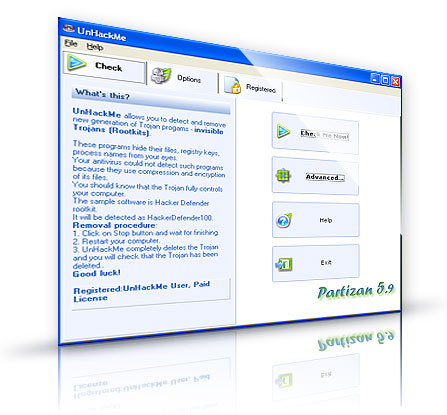
Click the Check button.

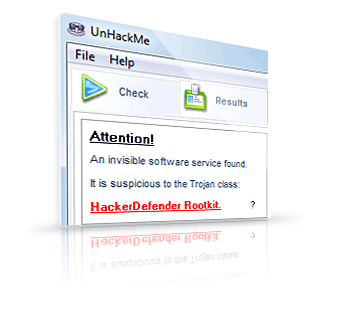
If a Trojan is found you will see the Results page.
Click on the Stop button and restart your computer.
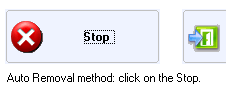
The Rootkit will be completely deleted at the next reboot of your computer.
System requirements
Windows 9x, 2000/2003/XP/2008/Vista/Seven or higher 32 or 64 bit.512 Mb RAM
CD/DVD drive or USB stick.
Purchase now!
Purchase includes:
• UnHackMe Single License - Electronic Delivery
• Warrior CD Image - Electronic Delivery
People say:
LisaThis solution works great. Thanks!
Jim
Works as advertised. Keep up your good work guys!