.NET
•  Greatis •  Security •  AppDatabase •  Utilities •  Delphi/CB • Visual Basic •  just4fun
.NET Software
.NET Components for Visual Studio .NET, Delphi 8, Delphi 2005 and Delphi 2006
Detailed information
Get Started
  • How To Use It?
  • How To Print ... ?
  • How It Works?

    Technical Details
  • Components
  • Architecture
  • Internal Calls
  • Features
  • Screenshots
  • Documentation

    Common Information
  • License Agreements
  • Recommended Licenses
  • Detailed Order Form

    Powered by Print Suite .Net
  • Poster It!

    See also
    Related products
    Nostalgia .NET new!
    Print Suite .Net
    Form Designer .Net
    Gradient Controls .Net
    iGrid Plotter
    Convay's Life .Net

    Related links
    MegaDetailed.NET
    Win32.hlp online version
    Delphi Tips
    Delphi to C#
    just4fun

    Special
    Free Software Promotion
    Offers for Resellers

    Follow us
    LinkedIn Blogspot Twitter Facebook

    Share this page
    Home Documentation License Download Order Support  
    Print Suite .NET
    Architecture

    Everything in Print Suite .Net is started from (and finished by) DocumentDesigner component. It contains all the information about printed document, supports printing and links PrintPreviewControl, PreviewToolbar and PreviewStatusBar. It's a heart of Print Suite .Net.

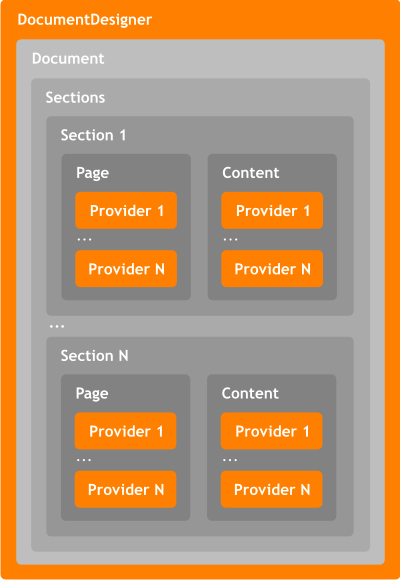
    The main property of DocumentDesigner is Document, that contains Sections property - list of document sections. The only reason that we should divide the document into several sections - we may be the need to have different types of pages. For instance, we can have cover page with some graphics and document title, then content pages, then main document pages with chapter header at the top and page number at the bottom, then pages with alfabetical index and then back cover. Of course, we can create all these pages manually, but the simplest way is to create several sections for cover, content, body, index and back cover and let specialized print providers to do all the job without manual code. As you can see below, we have two lists in each page section - Page and Content. The providers added into Page list will be applied to all the pages of the section, and the real content and page count will be determined by the providers from Content list. So, if we need the page number on each page, all we have to do is to add PageNumberProvider into Page list of the section. Both Page and Content may contain an arbitrary number of providers, as well as the Sections list may contain arbitrary number of sections.

    In the general case, the document looks like this:


    Print Suite .Net Architecture

            Public components, available in the Visual Studio's Toolbox


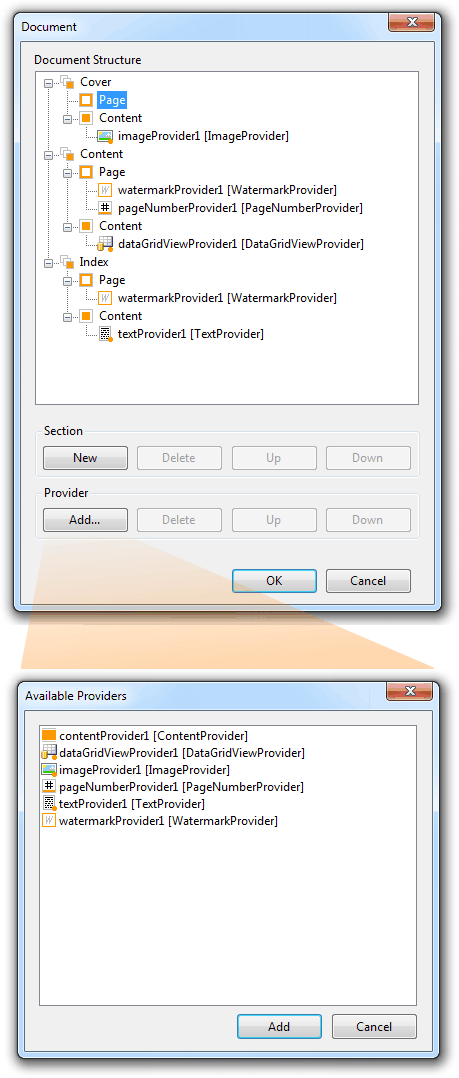
    Structure of the document is being edited by the editor of DocumentDesigner's Document property. This editor allows to create, reorder and delete sections and add, reorder and delete providers in the Page and Content lists of each section:


    Document Property Editor


    As you can see you can add providers into Page and Content list of any section, just click the Add button and you'll see list of providers from your current form. We don't have to worry about page count, all that we have to do is simply add sections and providers, and DocumentDesigner will do the rest.

    Must-have .Net Products
    Nostalgia .Net Nostalgia .Net
    Power of Win32 API in convenient .Net classes and components. The easiest way to expand your possibilities without Win32 skill. Full source codes incliuded. More »


    Print Suite .Net Print Suite .Net
    Set of components for easy printing texts, images and grids from your WinForms applications. Also Greatis Print Suite .Net offers the advanced DocumentDesigner component that allows creating complex print jobs from simple separated print content providers. More »


    Greatis Software Greatis | Security | AppDatabase | Utilities | Delphi/CB | Visual Basic | .NET | just4fun

    Contacts | Add to Favorites | Recommend to a Friend | Privacy Policy | Copyright © 1998-2012 Greatis Software

    eXTReMe Tracker