Security
•  Greatis •  AppDatabase •  Utilities •  Delphi/CB •  Visual Basic • .NET •  just4fun
RegRun Security Suite
Not an antivirus. Detects and removes rootkits/malware/adware that your antivirus could not.
Features
Benefits

Warrior CD...

Examiner...

Shortcut Antivirus

Stuxnet Remover

Startup Monitor...

Bootlog Analyser...

Advanced MSConfig...

Know more?
TDL4 Removal Video

TDL3 Removal Video

Screenshots

FAQ

On-line manual

Print PDF

One-click purchase
RegRun Suite Platinum
Download trial
RegRun Suite Platinum
Blogs & Forum
Malware Analysis and Removal blog

Newest viruses and malware

System Software Research

Greatis Forum

Thank you!

International
Download Russian

Download Ukrainian

Join our localization team

Home Download Order Support   Newsletter Your shopping cart ?
Start Control

Screenshot RegRun Security Suite includes the powerful startup manager called RegRun Start Control.
Start Control provides an unusually friendly interface to users, who can easily and quickly provide detailed information about, suspend, resume, alter, or delete any of the programs within the Windows startup.

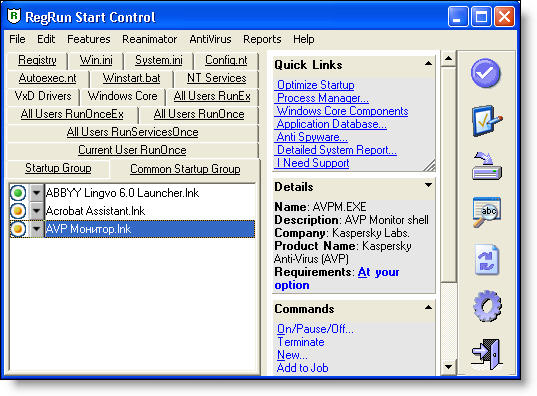
Start Control active pages:

  1. Registry
    In the registry page you can see the contents of the keys:
    • HKLM\Software\Microsoft\Windows\CurrentVersion\RunServices.
      This key contains systems programs such as SYSTRAY etc. These programs start before other keys and the startup folder. If you work in a network, note that these programs run before you enter your user password. All programs are common for all users on the computer.
    • HKLM\Software\Microsoft\Windows\CurrentVersion\Run.
      Programs in this key run after that user enters his or her network password. All programs are common for all users on the computer.
    • HKCU\Software\Microsoft\Windows\CurrentVersion\Run.
    Programs in this key run only for specific users. You can select function by click on the icon or choosing the item in the popup menu (right mouse button click).
  2. Win.ini file is often used in Microsoft Windows 3.1, but in later version of Windows it is rarely used. Wini.ini is saved for backward compatibility. There are two lines for running programs: Load and Run. All programs are divided by commas.
    Be careful!
    This file is often used by trojan programs!
  3. The "System.ini" file is often used in Microsoft Windows 3.1 and exists for backward compatibility. There is one line that is used for launching programs - Shell.
    Be carefull! Don't change this line if you are not sure.
    Most of trojan programs use the Shell for auto launching.
  4. Config.sys is an especially important file for MS-DOS. In Windows'95 and Windows NT this file is used only to configure some parameters and for backward compatibility.
  5. Autoexec.bat is an especially important file for MS-DOS. In Windows 95 and Windows NT, this file is less used and exists only for backward compatibility.
  6. Winstart.bat
    This is an obscure file. Many users don't know that Windows runs programs from it. Command syntax is similar to autoexec.bat. Normally, winstart.bat is empty. If you find any programs, be careful.
  7. Startup folder
  8. Common Startup folder
  9. Windows NT/2000/XP services
  10. Run Once registry keys
    The RunOnce subkey of HKEY_LOCAL_MACHINE\SOFTWARE or HKEY_CURRENT_USER\SOFTWARE stores the names of programs that Windows runs at startup the next time the system starts. When these programs are run, their names are deleted from the RunOnce subkey so that they are not run again automatically.
  11. RunEx
    Windows 98 ( and Windows 2000) includes the RunOnceEx and RunEx registry keys for additional functionality of Run registry keys. The syntax and format used for these keys is different from the RunOnce and Run keys.
  12. VxD and Drivers
    Why we need know about VxD and drivers?
    System drivers is a low level of the startup process. Many serious problems may be resolved by managing these drivers. RegRun gives you the unique possibility to get full control of your computer.
  13. Windows Core Components
    Windows Core Components contains Active Setup items, Browser Helper Objects, Shell Loggers DLLs, Shell DLLs, Static VxD (Windows 9X/Me only).
    These components are very important for stable Windows work.

RegRun Start Control will warn you about changes in the registry startup keys and allow to decline these changes.

Buy Now! Purchase RegRun

Read more information...


What's new?

January 23 2012

Released RegRun Security Suite 6.9.7.97
Full version is available for download.
Update is free for registered users

Released RegRun Reanimator 6.9.7.97 - freeware software for detecting and removing rootkits & malware.

August 3 2011

Remove 1see.ir/j/ infection from your osCommerce site

August 2 2011

BootRescue free software for Master BootRecord (MBR) backup/recovery

July 29 2011

Remove Exero.eu/catalog/jquery infection from your web site

Remove willysy.com/images/banners infection from your web site


All News


RegRun is able to remove TDL 4 rootkit (MBR infector) on the Windows 32 and 64 bit!


Released Shortcut Antivirus is a free of charge software for protecting against Microsoft LNK vulnerability.


Released Stuxnet Remover is a free of charge tool for Stuxnet/Tmphider rootkit removal


Added detection and removal of Stuxnet Rootkit(mrxnet.sys, mrxcls.sys).


Resolve "Google search redirect problem". Remove TDL3+ rootkit now!


How to resolve the "msls52.dll not found" problem.
New attack against UXTHEME.DLL...

How to resolve the "themed32.dll not found" problem...


Use RegRun Warrior for rootkit removal
Rootkit detection and removal takes 10 minutes with one computer reboot!


Be careful! The QVOD player installer may be a Trojan...


New! Examiner reveals hidden rootkits and infected system drivers!


New Porno banner Troan Oficla removal instructions


TDSS/Alureon removal instructions


Resolving problem with Google redirect MAX++/TDSS rootkit (win32k.sys:1, win3k.sys:2).


Video Lesson how to remove WinLocker Trojan

Malware Removal Lesson


Windows Explorer Redirection DLLS is a new dangerous Windows startup hole...


RegRun has been reviewed by 3d2f.com Software Directory: RegRun Security Suite is an excellent tool that will reliably protect your computer from a plethora of existing and emerging threats and will keep malware at bay.


Removing Medichi Rootkit


Removal of Noskrnl.exe and Noskrnl.sys Rootkit (Spooldr clone)


Removal Baidu rootkit (cnprov.sys)


Removal Spooldr(ecard.exe) rootkit


Fixing BSOD
in Winlogon Process


Removal Areses Trojan


Virus Feebs rootkit removal story


What's this? Rthdcpl.exe - Illegal System DLL Relocation...


Warning! Rootkit Unhooker


Read our article about Unreal rootkit...


Released free Rustock Rootkit(lzx32.sys) removal tool


A#######.sys is a rootkit?


Rootkit Removal instructions: ntsystem.exe


What is BDGuard.sys?


Virus or not? SPTD####.sys


What is mc21.tmp, mc22.tmp, mc23.tmp?


ICQCHK.exe, MSX.DLL free remover...


Services
Ask Computer Guys

Windows startup programs

Articles
Using Registry Tracer...

RegRun against Trojans and Viruses

Specify an order for startup programs

RunGuard prevents a launch...

Using Bootlog Analyser...

They say
"RegRun Security Suite is one of those very rare tool kits that no one who is serious about protecting their PC should ever be without. This toolkit covers all the bases when it comes to eradicating the attempted security threats from malware that we all face - daily. The near real time tech support, direct from Greatis, is nothing sort of superb, something that can be rarely said these days! I have no hesitation in recommending this suite to anyone."

Miles Pearson

Wilders.ORG. Security advisors recommend...

Testimonials
You guys are awesome!!!!
Traci www.pentagonattack911.com

Bob Schmulian:
Absolutely love it and have recommended to many people!

Ian Robinson:
It is FANTASTIC! It has saved my life on more than one occasion since I purchased it less than 6 months ago. I now would not run my system without it... it's worth many times the cost! The service and support are terrific. Helpful - friendly - and accommodating; and generally a reply is received within 12 hours. Just great.

Theodore Soucie:
Since RegRun was installed my system is more stable. I use to experience freezeup daily. I have not had a crash.

Awards
Paul's Picks
Shareware Winner  

More...


Greatis Software Greatis | Security | AppDatabase | Utilities | Delphi/CB | Visual Basic | .NET | just4fun

Contacts | Add to Favorites | Recommend to a Friend | Privacy Policy | Copyright © 1998-2012 Greatis Software

hit counter for tumblr