|
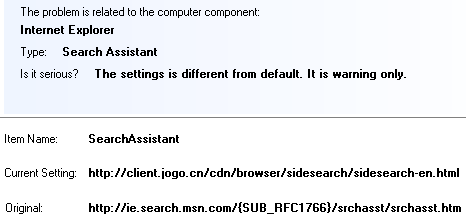
Baidu search toolbar allows
using Chinese domain names during browsing web sites.
All information about visited web sites are collected and may be used
by the manufacturer of the toolbar.
What's wrong?
The toolbar is useless for non-Chinese users and we don't know why the
different web sites offer to download this software.
Baidu software doesn't hide their files and registry keys.
But the
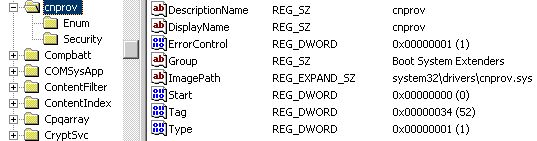
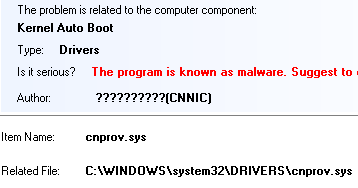
Baidu kernel driver "cnprov.sys" prevents the Baidu's files and
registry keys from deletion.
A user has a right to uninstall toolbar
using included uninstaller.
It looks good but I don't like that the simple toolbar uses the
kernel
driver that hooks the registry and files operations on the kernel level.
Each kernel driver decreases performance and increases the risk
of
BSOD. The kernel drivers are good for hardware devices or in the
antiviral software. But it is absolutely not allowed for
standard
Windows software.
Why the Baidu uses the kernel driver in this version of this software?
The answer is one. It's hard in removal and some of the users couldn't
do it.
They will be under the Chinese watch or they need to format
their computers. Annoying procedure isn't?

RegRun detects and removes Baidu
software.

RegRun Reanimator detects the "cnprov.sys" driver
and it removes the driver from the registry at the next reboot.
But you need to repeat the deletion procedure
at next check. This why the driver is already loaded in memory.
We need using reboot to unload the driver.
Also, we need to remove idnsvr.exe and cnprovh.dll
from Windows startup.
After that we can simply delete Program
Files\OCINS subfolder and the %SysDir%\cnprov.dat.

Conclusion
Download RegRun Reanimator (free of charge, no
ads):
http://www.greatis.com/reanimator.zip
Suggest you to use RegRun Platinum Edition
to be sure that your rootkit's clear!
Good luck!
Dmitry Sokolov
Would you like to add your opinion?
|