 |
 |
.Net |  |
||||||||||||||||||||||||||||
|
● Greatis | |
 |
|
● Security | |
|
|
● AppDatabase | |
|
|
● Utilities | |
|
|
● Delphi/CB | |
|
● Android | |
|
|
● just4fun | |
||||||
|
|||||||||||||||||||||||||||||||
|
Nostalgia .Net • Window InformationFind any window and any control on the system, analyze and change it
SystemWindow class implements convenient interface to system window, represented by window handle. SystemWindow class has tens properties that replace tens WinAPI calls and sending messages. Using SystemWindow you can get ans set any property of any window and control in your system. When you have window handle, just create SystemWindow class for this handle and edit this window with easy. For instance the following example makes some window stay-on-top:
So, if we know handle, we can get and change tens paremeter of each window and control, including text, style, size, position and much more... OK, but how we can get the handle of window? Good question. And we have an answer - WindowInformation. This component allows to search any window and control in the system. All the found windows collected in Windows list. You can filter windows list when SearchWindows call as well as in WindowAdding event that occurs for each found window. The following example finds all the Notepad windows and change the caption of each found window:
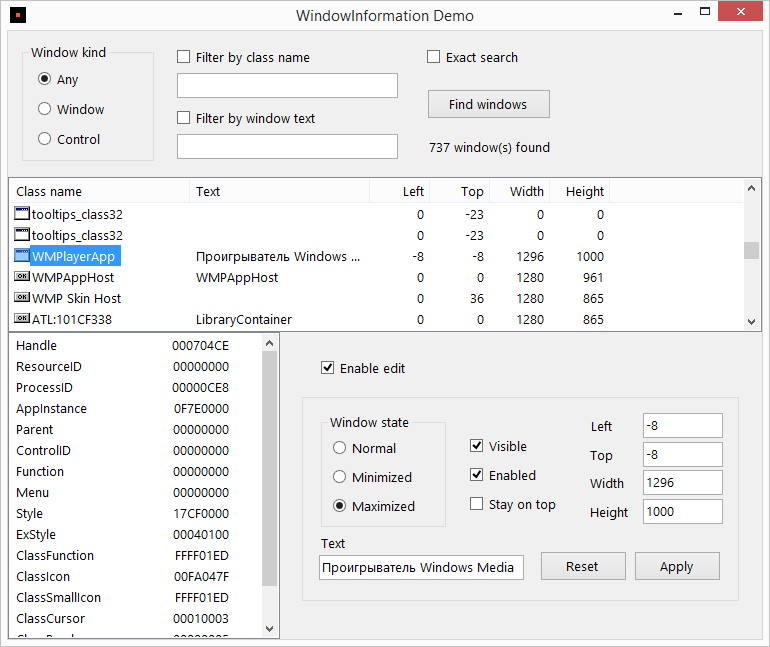
Demo project shows all the Window Information's features:
|



|
 |
Greatis | Security | AppDatabase | Utilities | Delphi/CB | Visual Basic | .NET | just4fun
Contacts | Add to Favorites | Recommend to a Friend | Privacy Policy | Copyright © |

|