Antivirus Coordinator
Open RegRun Start Control. Go to the main menu, Antivirus, Coordinator.
Click on the "Auto Detect" button to detect many of the known antiviral programs.
1) Antiviral Toolkit Pro.
2) Norton Antivirus.
3) McAffe Virus Scan.
4) F-Secure.
5) PC-cillin.
6) Nod32.
If you have another antiviral software program, click the Add button and fill in the form.
To use registered antiviral software go to the main menu, Antivirus, "Launch Registered Antivirus".
If you use the Antiviral Toolkit Pro, RegRun will help you to do a fast test of the startup files or folders. RegRun creates special text file with file names and launches your AVP with this file. This is very useful because the testing of suspicious startup files is faster than full disk testing.
Unfortunately other antiviral software doesn't support command line options to test from a file list. But many of them use a "shell" command to test files or folders using Explorer.
RegRun supports shell commands like Microsoft Explorer.
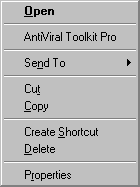
Select any item and get a popup menu.
Select "Antivirus&Commands". You will get a system popup menu for executing a file.
For example:
You can use this technique in WatchDog!
To fast test the Startup folders, go to the main menu, "Antivirus", "Check for viruses in the startup folders".
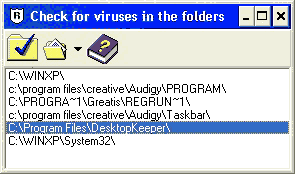
Select a folder and click on the tick icon.