First experiments
Now, it's a time to experiment with RegRun. Check out its great features!
Auto detection.
Click "Start" button in Windows taskbar, choose "Run" and enter "sysedit". Press Enter. You will see the system editor.
Insert a new line in autoexec.bat, for example "rem test".
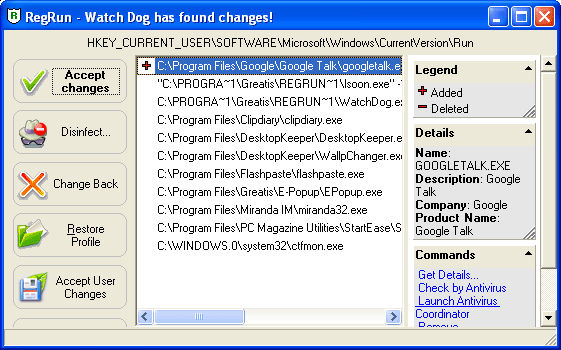
After that, press F9 or click "tick" button.
You will see "+" on the left of line "rem test".
You have five choices:
v Change Back.. This will cancel all of the changes. Any added lines will be removed and deleted items will be restored.
v Accept changes. This allows you to accept the changes. RegRun will then accept them and will not refer to them again.
v Restore profile. You can restore your RegRun profile by clicking on Change Back.
v Accept Made Changes. It allows you to modify and then save the current list manually. If you select this choice, press "Enter" or the "Edit" button. Then, after making any edits, select "Save".
v Ignore. Selecting "Ignore" will result in no action being taken. The next time you boot up, the program will detect the same changes again and warn you of them again.
Pause/resume items
You may suspend the running of the program, however not delete it. Select item and click on arrow to change item state.
You will see a popup menu.
Select traffic light and click left mouse button (if you choose red light, you will delete the item). After that, the item light changes to yellow color and you may see the item at the bottom of the list. RegRun shows green items before yellow items.
RegRun uses an algorithm that is compatible with Microsoft technology for suspending programs. If you have Microsoft Windows 98, you may run System Configuration utility and see that the item shows it has paused. However, RegRun works on Windows 95 and Windows NT 4.0. These operation systems will also have a suspend feature.
You can pause or resume each item easily. If you use the keyboard, press CTRL+Enter and you will see a menu. Choose item in menu and press Enter to change item state.
You can select the multiple items in list and set it simultaneously.
You need to restart your computer to make changes.
If you want know more about any program, RegRun helps you. Press CTRL+/ (or choose "Properties" in popup menu) and you will see file information window.
For example:

This information is helpful if you are in doubt about file's source.