|
Medichi.exe, murka.dat, medichi2.exe Rootkit Free Removal Software
We made a special RNR file for removing Medichi
rootkit.
If it doesn't work by itself you need to use the manual method.
Please follow instructions step by step:
1. Download the latest version of RegRun Security Suite,
UnHackMe or RegRun Reanimator.
2. Download the "medichi.rnr"
file and save it to your hard drive.
3. Install RegRun Suite, UnHackMe or unzip Reanimator.zip file.
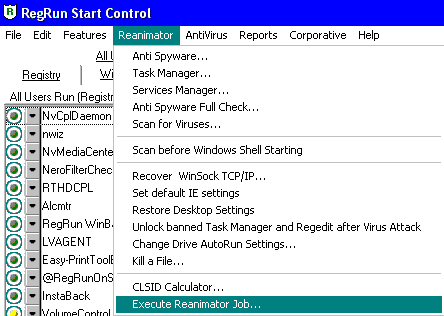
4. Open RegRun Start Control or "Reanimator.exe".
5. Skip the "Assistant" screen and open "Reanimator" menu.
Choose "Execute RNR file" option.

6. Locate the "medichi.rnr"
file on your computer.
7. Proceed to restart of the computer immediately.
Skip the Windows File Protection dialog.
8. All rootkit files will be removed after you reboot of your computer.
9. Use Windows search feature to find "*.del" files.
Delete these files. It's the safe copies of the removed viruses.
If you want to restore
deleted beep.sys, use your Windows CD.
Copy "beep.sy_" and expand.exe from the Windows CD to the
Windows\System32\Drivers folder.
Open cmd.exe.
Type in:
cd c:\windows\system32\drivers
expand beep.sys_ beep.sys
Otherwise you can download beep.sys from the Internet. Use Google
for searching.
Manual
Removal of the Medichi rootkit (or its clones)
1. Download the latest version of RegRun Security Suite,
UnHackMe or RegRun Reanimator.
2. Download the "medichi.rnr"
file and save it to your hard drive.
3. Install RegRun Suite, UnHackMe or unzip Reanimator.zip file.
4. Open RegRun Start Control or "Reanimator.exe".
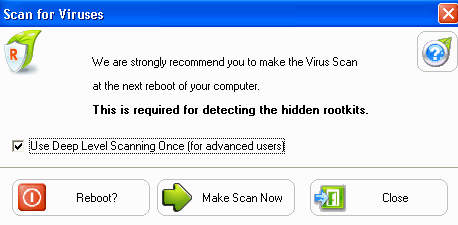
5. Cgoose "Scan for Viruses".
6. Set option for Deep Level Scanning" option.

7. Click on the "Reboot".
8.You will see the "Virus Scan" dialog.
The scanning may take 2-5 minutes because it checks for the digital
sign for Microsoft drivers.
9. Click on the "I'm not shure" button if RegRun doesn't display the
full path to the "medichi.exe".
10. Click "Get it out" button to delete:
c:\windows\system32\drivers\beep.sys
c:\windows\medichi.exe
c:\windows\medichi2.exe,
c:\windows\murka.dat.
11. Choose "Reboot" option.
12. After the successful virus scan open "Reanimator.exe" or RegRun
Start Control.
13. Go to the "Reanimator" menu and choose "Unlock banned Task Manager
and Regedit after Virus Attack".
14. Use Windows search for finding "*.del" files.
Delete these files. It's the safe copies of the removed viruses.
Conclusion
Download RegRun Reanimator (free of charge, no
ads):
http://www.greatis.com/reanimator.zip
Suggest you to use RegRun Platinum Edition
to be sure that you are rootkit's clear!
Good luck!
Dmitry Sokolov
|